Concurrent profile limit is used to limit how many profiles each member can open at the same time on the same device. This limit only applies to members other than the Super Admin. The Super Admin account is not affected.
- The Super Admin can go to Global settings > Profile Settings and enable Concurrent profile limit.
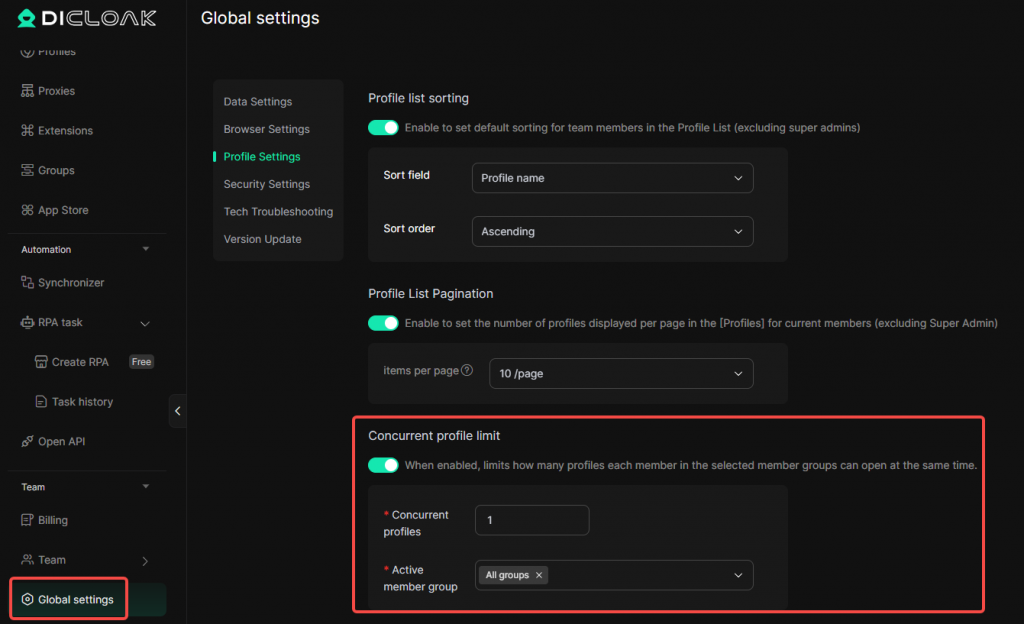
- After enabling it, set Concurrent profiles and select the Active member group. If [All groups] is selected, the limit will apply to members in all member groups.
- For example, if Concurrent profiles is set to 5, each member in the active member group can open up to 5 profiles at the same time on the same device. After reaching the limit, the member will not be able to open more profiles. They need to close the currently open profile before they can open another one.
- Once configured, the setting takes effect automatically. When members open profiles later, the limit will be checked accordingly.