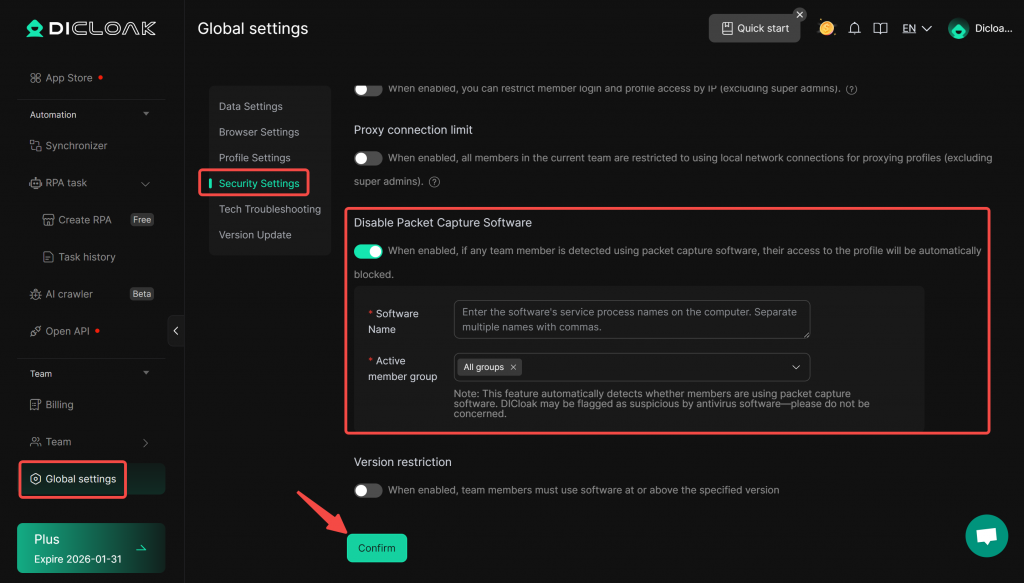
After you disable the packet capture software, if it detects that a current team member is using packet capture software, it will automatically prohibit them from accessing the Profile. This can prevent team members from using packet capture tools to capture information such as account passwords after you have enabled account sharing, thereby protecting your information security.
Operation Process:
- Enter [Global Settings] interface. Under the [Security Settings], locate [Disable Packet Capture Software] module, and enable this feature.
- In the “Software Name” input field, enter the name of the packet capture software as displayed in your computer’s Task Manager.
- Select the “Active Member Group”, members within this group will be unable to open the profile while using packet capture software.
- After confirming the information is correct, click “Confirm” to save the settings.