In DICloak, Super Admin owns the highest level of operational authority within a team. Typically, if you create a team, you are automatically designated as the Super Admin of the team, and there is only one Super Admin in each team. If you need to transfer Super Admin privileges to another team member, you need to upgrade from Free Plan to Plus Plan. Specific steps to follow are provided below:
Operation Guide
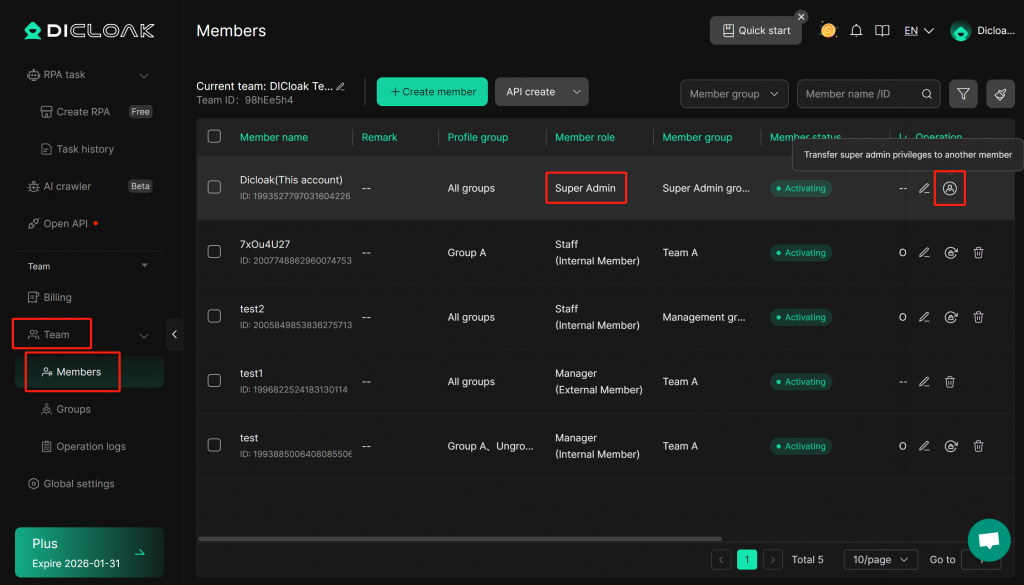
- Navigate to [Team] in the left sidebar and enter the [Members]. Find your Super Admin account, and click the “Transfer Super Admin” icon under the [Operation] column.
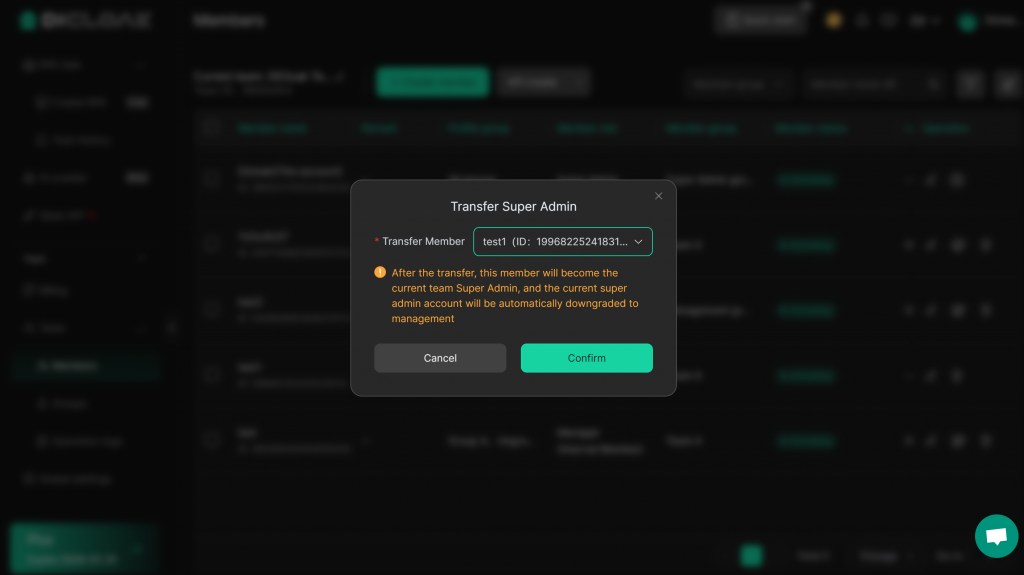
Select the member to whom you wish to transfer the Super Admin permissions. Please note that only internal members are eligible to become the new Super Admin. Click “Confirm” to complete the transfer.
Frequently Asked Questions
1.Can I transfer Super Admin with the Free Plan ?
So far, Free Plan does not support transferring Super Admin privileges. This function is only available with the Plus plan. You can upgrade your subscription to perform this operation.
2.After I transfer Super Admin privileges to another member, what will my role in the team be?
The original super admin account will automatically downgrade to an Admin role and be reassigned to the Management group.
3. Why are some team members not displayed in the option list when transferring the Super Admin role
You can only transfer the Super Administrator permissions to an internal member of the team. Therefore, external members will not appear in the option list.